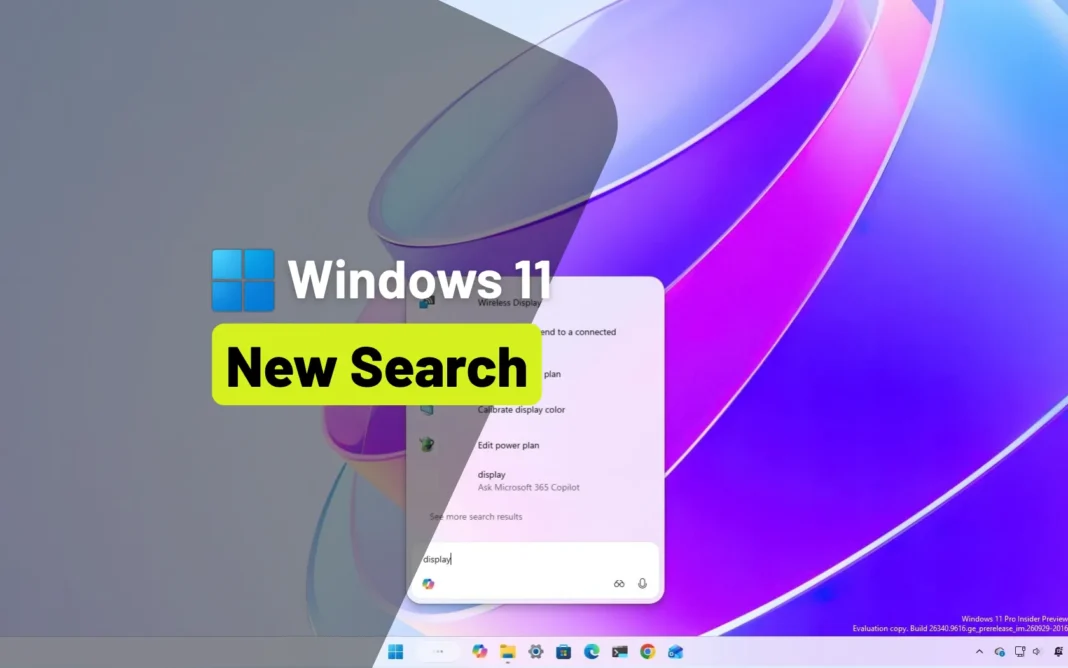
Microsoft is turning Windows 11 Search into something closer to an assistant than a search box. At the company’s fall Windows and Surface event in San Francisco, shown in Pakistan today, Microsoft unveiled a redesigned Search that performs actions instead of just listing results, with Copilot built directly into the taskbar.
The company says the new Search can understand typed requests and carry them out without opening the Settings app. Users can type plain commands such as “switch to dark mode”, “turn on night light” or “turn on Bluetooth”, and Search will apply the change straight away. Other examples shown by Microsoft include “dim my screen”, “mute”, “minimize all my windows” and “arrange windows on screen”. Phone-related actions are planned through Phone Link, including sending a text message from Search with a connected smartphone.
“At its core, the new Windows Search experience is quicker, more efficient, so you can find your apps, settings, and files faster,” Pavan Davuluri, Microsoft’s executive vice president of Windows and Devices, said at the event.
A cleaner, rebuilt interface: Windows 11 AI Search
The redesign is built on WinUI 3, Microsoft’s modern interface framework. The large preview pane is gone, replaced by a single list of results in a compact vertical panel. Microsoft said its data shows almost all clicks in the existing Search happen in the results list, so it removed the visual clutter around it.
Matching has also improved, with better handling of typos and synonyms, and each result now carries a small label underneath, such as “System settings” or “Control panel”, so users know what they are about to open. Richer file previews and inline web answers, for queries like weather or facts, are planned later this year. The feature is rolling out to Windows Insiders now, with a full launch expected later this fall.
Copilot moves into the taskbar
The same update brings Copilot into Search itself. Users will be able to ask Copilot questions directly from the taskbar search box without opening the dedicated Copilot app. Microsoft says this will be opt-in and will arrive in select markets later this year.
The change is part of a wider push around what Microsoft calls Hybrid Intelligence. Copilot will route requests to AI models running on the PC itself when a local model can handle the task, falling back to cloud models only when needed. That keeps personal data on the device and avoids extra cloud processing costs. Copilot can also complete local actions, though making changes to files will require the user’s permission.
Microsoft tightens the rules for AI agents
Security was a recurring theme at the event. Davuluri said the AI agents that run on PCs today are “fundamentally insecure because they have broad system access”, and Microsoft answered with Microsoft Execution Containers, now generally available in Windows 11. The technology lets organisations set which files and networks an AI agent can reach, built around containment, identity and manageability. Microsoft said OpenAI’s Codex and OpenClaw already support it, with Anthropic’s Claude Code and Perplexity to follow.
FAQs
What can the new Windows 11 Search do?
It can run settings changes and window-management commands from typed requests, such as switching themes, adjusting volume and arranging windows, without opening other apps.
When will it be available?
It is rolling out to Windows Insiders now, with a full public launch planned for later this fall.
Is the Copilot integration on by default?
No. Microsoft says Copilot answers in the search box will be opt-in, arriving in select markets later this year.
What is Hybrid Intelligence?
It is Microsoft’s approach of running AI tasks on the PC’s own models when possible, using cloud models only when the local hardware cannot do the job, which keeps data on the device.
Related stories
- How to Screenshot on Windows: 5 Easy Methods That Work
- How to Speed Up a Slow Laptop: 9 Proven Fixes That Actually Work
- Instagram Tests AI Song Creator in DMs: Turn Your Words Into a Song
Originally reported by Pureinfotech.