


WhatsApp Events Now Open to Non-Users
WhatsApp Events now lets users invite people who do not have a WhatsApp account, making it easier to organise gatherings without asking everyone to install the messaging app.
The update also brings a dedicated Events Home section, customisable invitations, guest management and reminders. WhatsApp announced the changes on November 5, and the features are rolling out gradually. The company expects them to reach all users over the coming weeks.
WhatsApp already lets users create events in individual conversations and group chats. The latest update expands that by allowing invitations to be shared outside the platform.
How invitations work without WhatsApp
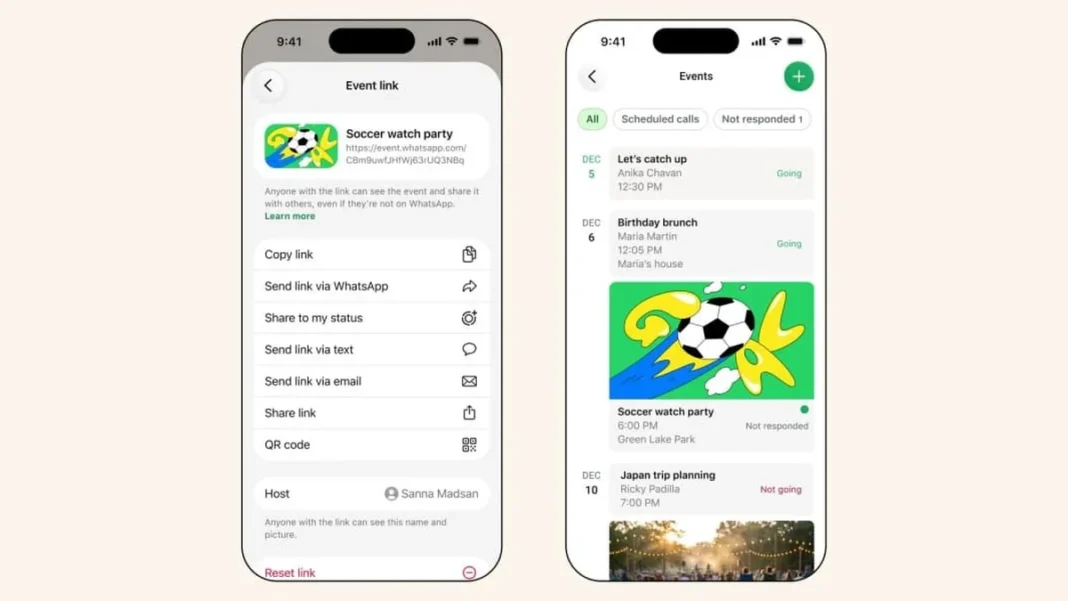
Users can create an event, add a cover photo and generate a shareable invitation link. Recipients can open the link in a browser to view the event details and confirm whether they will attend, even if they do not have a WhatsApp account.
The change removes the need for guests to download the app or register simply to respond to an invitation. Family members and friends who stay off the app can still answer, and organisers can see who is coming.
WhatsApp has also added privacy protections. Event organisers’ phone numbers will not be visible to guests they do not know. Guests without WhatsApp accounts will only be able to see the event’s address after submitting their RSVP.
WhatsApp Events Home keeps invitations in one place
WhatsApp is also introducing Events Home, a central location where users can organise and manage their events. The section lets users create customised invitations, track responses and manage upcoming gatherings without searching through individual conversations.
Users can set custom event reminders and allow guests to bring an additional person through the new plus-one option. Events Home displays both past and upcoming events, including those created by the user and invitations received from others.
To reach the new section, users open WhatsApp on their phone, go to Settings, select Events, and create a new event or view existing invitations. They add the event details and a cover photo, then share the invitation link with guests.
Why it matters in Pakistan
WhatsApp is the messaging app most Pakistanis use every day, and event planning often runs through it. Wedding functions, family dinners, office gatherings and cricket meet-ups are all organised in WhatsApp groups.
The problem has always been the guest who is not on the app. An uncle without a smartphone, a colleague who deleted the app, or a relative abroad who never installed it could not be invited through the group. Organisers had to call or message them separately, and replies came back in scattered threads.
The new link changes that. One invitation reaches everyone, whether or not they use WhatsApp, and the replies land in one place. For hosts, it cuts the chasing. For guests, it removes the need to install an app for a single evening.
The change builds on WhatsApp’s steady run of new tools. WhatsApp added four new group chat features in October, and the app keeps adding ways to organise people without adding clutter. Pakistan’s mobile base keeps growing too, with around 1.8 million 5G users across 24 cities and YouTube viewership that leads the world, according to the PTA.
Frequently asked questions
How do I invite someone without WhatsApp?
Create an event in WhatsApp, add a cover photo and generate a shareable invitation link. Send the link to your guest. They can open it in a browser, view the details and confirm whether they will attend, without installing the app.
Will guests see my phone number?
No. WhatsApp says event organisers’ phone numbers will not be visible to guests they do not know.
When will I get the feature?
WhatsApp says the updated Events features are already rolling out, but the rollout is gradual. Some users may not see the new Events section or the external invitation options right away. The company expects the update to reach everyone over the coming weeks.
How do I find Events Home?
Open WhatsApp, go to Settings and select Events. From there you can create a new event or view existing invitations, track responses and set reminders.